|
|
 |
|
Trimming the Fat Added on: Wed Apr 09 2003 |
| Page: 1 2 3 4 5 6 7 |
Because of the complexity involved with optimizing services for individual needs I am also including an excellent roundup/guide written by Black viper in case anyone wants some more in-depth explanation or ideas about what they can/can�t disable.
http://www.blkviper.com/WinXP/servicecfg.htm
Finishing the Liposuction
Disabling most of XP�s unique �flair� results in near Windows 2000 Ram usage. But this is only the first step. Not only can you restore the original look of 2k but you can also reduce ram/cpu usage. Further utilizing a variety of other utilities will allow you to tweak Windows XP even further, restoring it a very streamlined athletic state. (As far as Microsoft OS�s go).
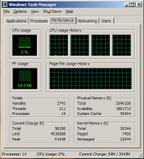
The image shown above is the level of resource usage achieved by using the tips listed here. Your results may vary. The four listed cpu�s are showcasing the fact that Windows XP fully supports Hyper threading in a Dual Xeon system, which was one of the primary reasons for writing this article.
Below you�ll find a list of other utilities you can use to further tweak Windows XP.
If you have any questions or comments, feel free to post a question in the hardware/technical section of the 3DLuVr forum.
http://www.jv16.org
http://www.microsoft.com/windowsxp/pro/downloads/powertoys.asp
http://www.tweakxp.com/tweakxp
http://www.blkviper.com/WinXP/servicecfg.htm
|
 |
|
|


